 VoidTuber
Props & headpats
Props are pictures, animated GIFs and 3D models that you put on the avatar or in the scene, throw at the avatar's
head, or use for headpats. They live in your props folder: ~/.local/share/vtube-linux/props.
Props ▸ Placed ▸ Add a prop file… copies files in for you.
| File | What it is |
|---|---|
.png .jpg | A flat picture (stickers, signs, emotes) |
.gif | An animated picture |
.glb .gltf | A 3D model (hats, glasses, held items, furniture) |
.vtprop | A prop made in Unity with the exporter's Prop Exporter: keeps its shaders
(Poiyomi…) and PhysBones. Only you see these; collab partners get pictures, GIFs and .glb models. |
From Unity: put the object in a scene, then Tools ▸ VoidTuber ▸ Prop Exporter…, pick a pivot (bottom middle suits hats) and click Export prop. Then Props ▸ Placed ▸ Rescan.
Have a model in another format (.fbx, .blend)? Open it in Blender and export it
as glTF Binary (.glb). That packs the textures into the one file.
Placed props
Props ▸ Placed ▸ Add a prop, pick one from your folder, then choose where it goes: head, neck, chest, hips, a hand, a foot, or the scene. Props on the body move with it. Then adjust its position, turn and size, and whether it always faces the camera. Each placed prop has a name and can be hidden, and redeems can show or hide it with Show / hide prop.
Throw & drop
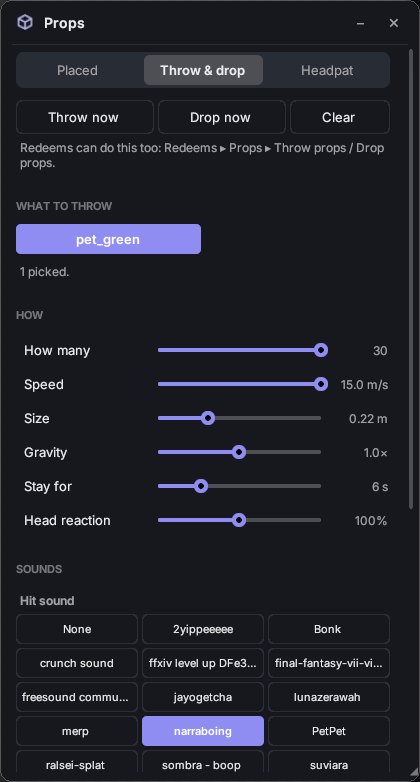
Throw now throws props at the avatar's head; Drop now rains them down from above. The head gets knocked back and springs back up.
- What to throw: pick one or more props. Each throw picks from them at random.
- How many, Speed, Size, Gravity, Stay for (how long they lie around) and Head reaction (how hard a hit knocks the head).
- Sounds: a sound from your soundboard for hits and for throws.
Redeems: Throw props and Drop props (Redeems ▸ Props).
Headpats
A petting-hand GIF sits on top of the head and pats it. The head squishes in time with the hand.
- Props ▸ Headpat ▸ Headpat now to try it.
- Hand: any picture or GIF from your props folder. If you don't pick one, it uses the first GIF with "pet" in its name.
- How long, Hand size, Height, Squish (how much the head squashes) and Speed.
- Redeem: Headpat (Redeems ▸ Props). Patting again during a pat keeps it going.
Props in a collab
In a collab, partners see the props on your avatar, your throws and drops, and your
headpats. The files are sent to them automatically. Pictures, GIFs and .glb models are sent;
.gltf files and props placed in the scene (not on the avatar) aren't. Each person in the Collab window
has a Headpat button. Switch off Partners can headpat me if you'd rather they didn't.
Files from partners are checked before the app opens them: only pictures, GIFs and self-contained
.glb models, up to 24 MB.